Mudanças entre as edições de "Device Authorization"
(Criou página com 'maniac') |
m |
||
| Linha 1: | Linha 1: | ||
To access GLA, each '''device''' must be authorized by your account. Every time an '''unauthorized device''' attempts to access it, you will receive an email with a link to '''authorize that device to access your account'''. | |||
This prevents unauthorized individuals, even if they discover your email and password, from accessing your account without permission. | |||
__TOC__ | |||
=='''What is device authorization?'''== | |||
----When you create your account, you will not need to authorize the device, making it easier to access your account for the first time. | |||
However, if you log in from another device such as a PC, notebook, or cell phone, the game client will send your hardware information and verify whether the device is authorized. If it is not, it will send a link to the '''email address linked''' to the account. At this stage, it is recommended to '''disable your antivirus/firewall''' and run the client as an administrator to avoid issues with your device’s permissions. [[File:Autmaq aviso1.png|link=|center|thumbnail|600x600px|This is the warning that appears when the device '''is not authorized'''.]] | |||
'''Remember''' to check your '''SPAM''' and '''TRASH''' folders in your email. The email address sending the authorization request is <code>noreply@grandlineadventures.com</code>, copy and paste it into your email provider’s search bar to make it easier to find. | |||
===Error: "Device not authorized to log in to this account"=== | |||
This error appears when you take too long '''to confirm''' your email after creating your account. To resolve this, simply: | |||
Log in to [https://support.gla.com.br/tickets '''Support'''] and open a ticket requesting a confirmation email. Once you confirm it, you can try accessing the game again, and the client will send the authorization link. | |||
=== Email Confirmation === | |||
You can check whether your email is confirmed at this link: [https://support.gla.com.br/account_settings '''Account Settings''']. | |||
===What to do if someone tries to access your account=== | |||
If you receive an authorization email and '''do not recognize''' the device attempting to access your account: | |||
* '''Do not click the link'''. | |||
* Immediately change your account password via the client or [https://support.gla.com.br/account_settings '''support''']. | |||
* Stay alert for new access attempts, and if in doubt, check the [https://support.gla.com.br/authorized_machines '''Authorized Machines'''] for your account. | |||
Edição atual tal como às 21h10min de 2 de setembro de 2025
To access GLA, each device must be authorized by your account. Every time an unauthorized device attempts to access it, you will receive an email with a link to authorize that device to access your account.
This prevents unauthorized individuals, even if they discover your email and password, from accessing your account without permission.
What is device authorization?
When you create your account, you will not need to authorize the device, making it easier to access your account for the first time. However, if you log in from another device such as a PC, notebook, or cell phone, the game client will send your hardware information and verify whether the device is authorized. If it is not, it will send a link to the email address linked to the account. At this stage, it is recommended to disable your antivirus/firewall and run the client as an administrator to avoid issues with your device’s permissions.
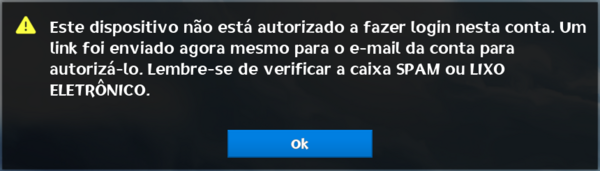

Remember to check your SPAM and TRASH folders in your email. The email address sending the authorization request is noreply@grandlineadventures.com, copy and paste it into your email provider’s search bar to make it easier to find.
Error: "Device not authorized to log in to this account"
This error appears when you take too long to confirm your email after creating your account. To resolve this, simply:
Log in to Support and open a ticket requesting a confirmation email. Once you confirm it, you can try accessing the game again, and the client will send the authorization link.
Email Confirmation
You can check whether your email is confirmed at this link: Account Settings.
What to do if someone tries to access your account
If you receive an authorization email and do not recognize the device attempting to access your account:
- Do not click the link.
- Immediately change your account password via the client or support.
- Stay alert for new access attempts, and if in doubt, check the Authorized Machines for your account.