|
|
| Linha 2: |
Linha 2: |
| {{PageLang|pt|title=Doações}} | | {{PageLang|pt|title=Doações}} |
|
| |
|
| O '''Grand Line Adventures (GLA)''' é um MMORPG gratuito, criado por fãs e ambientado no universo de ''One Piece''. As doações ajudam a manter os servidores e o desenvolvimento do jogo, mas '''não são necessárias para jogar'''. | | O '''Grand Line Adventures (GLA)''' é um MMORPG gratuito, criado por fãs e ambientado no universo de ''One Piece''. Se quiser apoiar o jogo, você pode fazer uma doação para ajudar na manutenção dos servidores e no desenvolvimento de novos conteúdos. '''Doar é opcional.''' |
|
| |
|
| Como agradecimento pelo apoio, você recebe Gemas {{Reward|itens=Gem;1|text=on}} para usar na '''[[Loja de Gemas]]''' e em outras funcionalidades do jogo. Também é possível negociar Gemas com outros jogadores dentro do jogo, conforme as regras. A venda por dinheiro real entre jogadores não é permitida. | | Como agradecimento, você recebe Gemas {{Reward|itens=Gem;1|text=on}} para usar na '''[[Loja de Gemas]]''' e em outras funcionalidades do jogo. |
|
| |
|
| === {{T|Valores e bônus|Amounts and Bonuses}} === | | === {{T|Valores e bônus|Amounts and Bonuses}} === |
| ---- | | ---- |
|
| |
|
| No Brasil, '''cada R$ 1,00 doado equivale a 1 Gema''', com doação mínima de '''R$ 15,00''' pelo site. Doações por '''Pix Efí''' ou '''Boleto Efí''' recebem bônus a partir de R$ 100,00: | | No Brasil, '''R$ 1,00 doado equivale a 1 Gema'''. A doação mínima pelo site é de '''R$ 15,00'''. |
|
| |
|
| {| class="wikitable" style="width:auto; max-width:100%; text-align:center;" | | Ao escolher '''Pix Efí ou Boleto Efí''', você também recebe Gemas extras em doações a partir de R$ 100,00: |
| | |
| | {| class="wikitable" style="width:auto; max-width:100%; margin:1em auto; text-align:center;" |
| ! Valor da doação | | ! Valor da doação |
| ! Bônus | | ! Bônus |
| ! Exemplo com o bônus | | ! Exemplo de recebimento |
| |- | | |- |
| | De R$ 15,00 a R$ 99,99 | | | De R$ 15,00 a R$ 99,99 |
| | — | | | Sem bônus |
| | R$ 50,00 → 50 Gemas | | | R$ 50,00 → 50 Gemas |
| |- | | |- |
| Linha 33: |
Linha 35: |
| |} | | |} |
|
| |
|
| O bônus é calculado automaticamente. '''PagBank e Cielo não oferecem bônus.''' Confira o total de Gemas no resumo antes de concluir o pagamento. | | O site calcula o bônus e mostra o total de Gemas antes do pagamento. '''PagBank e Cielo não oferecem bônus.''' |
|
| |
|
| === {{T|Como doar|How to Donate}} === | | === {{T|Como doar|How to Donate}} === |
| ---- | | ---- |
| | |
| | Escolha o caminho que preferir: |
|
| |
|
| <tabber> | | <tabber> |
| |-|Pelo site= | | |-|Pelo site= |
|
| |
| # Acesse a [https://support.gla.com.br/donate página de doações] e entre na sua conta. | | # Acesse a [https://support.gla.com.br/donate página de doações] e entre na sua conta. |
| # Informe o valor, escolha o método de pagamento e confira o total de Gemas no resumo. | | # Escolha o valor e o método de pagamento. |
| # Preencha os dados solicitados e siga as instruções para continuar. | | # Preencha os dados solicitados e siga as instruções para pagar. |
|
| |
|
| Para '''Pix e boleto''', você preenche os dados e gera o pagamento na própria página. Depois, pague pelo aplicativo do seu banco ou pelo canal de sua preferência. Para '''PagBank e Cielo''', você será direcionado ao site do provedor para concluir o pagamento.
| | * '''Pix e boleto:''' você gera o QR Code ou o boleto na própria página e faz o pagamento pelo aplicativo do seu banco ou por outro canal de pagamento. |
| | * '''PagBank e Cielo:''' você será direcionado ao site do provedor para concluir o pagamento. |
|
| |
|
| |-|Pelo jogo (Pix)= | | |-|Pelo jogo (Pix)= |
|
| |
| # Abra a '''[[Loja de Gemas]]''' e selecione a opção de doação por '''Pix'''. | | # Abra a '''[[Loja de Gemas]]''' e selecione a opção de doação por '''Pix'''. |
| # Informe seu '''nome completo, CPF e valor da doação'''. | | # Informe seu '''nome completo, CPF e valor da doação'''. |
| # Confira os dados e siga as instruções exibidas para concluir o pagamento pelo aplicativo do seu banco. | | # Confira os dados e siga as instruções da tela para pagar pelo aplicativo do seu banco. |
|
| |
|
| [[Arquivo:Pixmetodojogo.png|center|alt=Janela de doação por Pix na Loja de Gemas, com os campos de nome, CPF e valor.|link=]] | | [[Arquivo:Pixmetodojogo.png|center|alt=Janela de doação por Pix na Loja de Gemas, com os campos de nome, CPF e valor.|link=]] |
| Linha 59: |
Linha 62: |
| ---- | | ---- |
|
| |
|
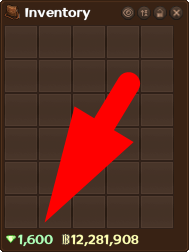
| Após a aprovação da doação, as Gemas aparecem no saldo da sua conta, no '''canto inferior esquerdo do inventário''', junto das Berries.
| | Quando a doação for aprovada, as Gemas serão adicionadas diretamente ao saldo da sua conta. Para encontrá-las, abra o inventário e olhe o '''canto inferior esquerdo''', junto das Berries: |
|
| |
|
| [[Arquivo:Inventorygembalance.png|center|alt=Inventário com uma seta apontando para o saldo de Gemas no canto inferior esquerdo.|link=]] | | [[Arquivo:Inventorygembalance.png|center|alt=Inventário com uma seta apontando para o saldo de Gemas no canto inferior esquerdo.|link=]] |
| <div style="text-align:center;"><small>Saldo de Gemas no canto inferior esquerdo do inventário.</small></div> | | <div style="text-align:center;"><small>Saldo de Gemas no inventário.</small></div> |
|
| |
|
| Os prazos estimados variam conforme o pagamento:
| | '''Prazo de recebimento''' |
| | |
| | O tempo para receber as Gemas depende da confirmação do pagamento e do método escolhido: |
|
| |
|
| {| class="wikitable" style="width:auto; max-width:100%; text-align:center;" | | {| class="wikitable" style="width:auto; max-width:100%; text-align:center;" |
| Linha 80: |
Linha 85: |
| |} | | |} |
|
| |
|
| Algumas doações passam por análise adicional após a confirmação do pagamento. Essa verificação pode levar até '''1 dia útil'''. | | Algumas doações precisam de uma análise da equipe após a confirmação do pagamento. Essa análise pode levar até '''1 dia útil'''. |
|
| |
|
| Você pode acompanhar a transação em '''Suas doações''', na [https://support.gla.com.br/donate página de doações]. Novas transações podem levar até '''6 horas''' para aparecer no histórico; esse prazo é de atualização do histórico, não de entrega das Gemas.
| | '''Histórico de doações''' |
| | |
| | Depois de pagar, você pode consultar o status em '''Suas doações''', na [https://support.gla.com.br/donate página de doações]. Uma nova transação pode levar até '''6 horas''' para aparecer ali. Esse prazo é apenas para a atualização do histórico. Para receber as Gemas, considere os prazos e a análise informados acima. |
|
| |
|
| === {{T|Precisa de ajuda?|Need Help?}} === | | === {{T|Precisa de ajuda?|Need Help?}} === |
| ---- | | ---- |
|
| |
|
| Se a doação ultrapassar o prazo informado, consulte o histórico e abra um [https://support.gla.com.br/tickets ticket no suporte oficial] com o '''comprovante da transação'''. | | Se o prazo informado já passou e as Gemas não chegaram, confira o histórico e abra um [https://support.gla.com.br/tickets ticket no suporte oficial]. Envie o '''comprovante da transação''' para que a equipe possa verificar sua doação. |
|
| |
|
| * '''Verificação:''' algumas transações podem exigir dados ou documentos adicionais. Siga as orientações dos canais oficiais. | | * '''Dados e documentos:''' algumas transações exigem informações adicionais para aprovação. Siga as orientações dos canais oficiais de pagamento e suporte. |
| * '''Cancelamentos:''' o prazo de devolução depende da instituição financeira responsável pelo pagamento. | | * '''Cancelamentos:''' o prazo de devolução depende da instituição financeira responsável pelo pagamento. |
| | * '''Trocas de Gemas:''' você pode negociar Gemas com outros jogadores dentro do jogo, conforme as regras. A venda por dinheiro real entre jogadores não é permitida. |
|
| |
|
| Antes de doar, consulte os [https://grandlineadventures.com/pt/rules Termos e Regras oficiais do GLA] e a [https://grandlineadventures.com/pt/privacypolicy Política de Privacidade]. | | Antes de doar, consulte os [https://grandlineadventures.com/pt/rules Termos e Regras oficiais do GLA] e a [https://grandlineadventures.com/pt/privacypolicy Política de Privacidade]. |
| Linha 98: |
Linha 106: |
| {{PageLang|en|title=Donations}} | | {{PageLang|en|title=Donations}} |
|
| |
|
| '''Grand Line Adventures (GLA)''' is a free-to-play, fan-made MMORPG set in the world of ''One Piece''. Donations help keep the servers running and support development, but '''you do not need to donate to play'''. | | '''Grand Line Adventures (GLA)''' is a free-to-play, fan-made MMORPG set in the world of ''One Piece''. If you would like to support the game, donations help keep the servers running and fund new content. '''Donating is optional.''' |
|
| |
|
| As a thank-you for your support, you receive Gems {{Reward|itens=Gem;1|text=on}} to use in the '''[[Loja de Gemas|Gem Shop]]''' and other game features. Gems can also be traded with other players in game, subject to the game rules. Selling them to other players for real money is not allowed. | | As a thank-you, you receive Gems {{Reward|itens=Gem;1|text=on}} to use in the '''[[Loja de Gemas|Gem Shop]]''' and other game features. |
|
| |
|
| === International Donations === | | === PayPal Donations === |
| ---- | | ---- |
|
| |
|
| '''PayPal donations are available only to players living outside Brazil.''' The number of Gems you receive depends on whether your PayPal account is verified '''before you pay''': | | '''PayPal donations are only available to players living outside Brazil.''' The number of Gems you receive depends on your PayPal account status: |
|
| |
|
| {| class="wikitable" style="width:auto; max-width:100%; text-align:center;" | | {| class="wikitable" style="width:auto; max-width:100%; margin:1em auto; text-align:center;" |
| ! PayPal account status | | ! PayPal account status |
| ! Donation amount | | ! Donation amount |
| ! Gems received | | ! Gems received |
| |- | | |- |
| | Unverified account or payment without a PayPal account | | | Unverified or no PayPal account |
| | USD 10.00 | | | USD 10.00 |
| | '''20 Gems''' | | | '''20 Gems''' |
| Linha 121: |
Linha 129: |
| |} | | |} |
|
| |
|
| If you want the verified-account bonus, check your account status and complete verification through PayPal before donating.
| | To receive the verified-account rate, complete PayPal verification '''before making your donation'''. |
|
| |
|
| === How to Donate === | | === Before You Donate === |
| ---- | | ---- |
|
| |
|
| # Open the [https://support.gla.com.br/donate donation page] and sign in to your GLA account. Select English if needed to view the international donation option.
| | The official donation page lists these conditions for PayPal payments: |
| # Check the character shown as the '''Gem recipient''' before continuing.
| |
| # Click the '''PayPal''' payment button and follow the checkout instructions.
| |
| # Complete the payment and keep your transaction receipt.
| |
|
| |
|
| === Delivery and Tracking === | | * '''Identity verification:''' high-value donations require a copy of your ID or passport. If requested, a link to submit the document will be sent to your email after payment arrives. If you do not provide it, the payment will be refunded with a '''USD 5 fee per transaction''', described on the donation page as a PayPal fee. |
| | * '''Payment disputes:''' disputing a payment results in an account ban. The donation page states that a '''USD 15 fee''' is required to remove the ban and that the case must be resolved through a support ticket. |
| | |
| | Before donating, read the [https://grandlineadventures.com/pt/rules official GLA rules] and [https://grandlineadventures.com/pt/privacypolicy Privacy Policy]. |
| | |
| | === How to Donate === |
| ---- | | ---- |
|
| |
|
| PayPal donations are credited within '''up to 3 days after confirmation'''. Some donations may require an additional review after payment is received; this review can take up to '''1 business day'''.
| | # Open the [https://support.gla.com.br/donate donation page] and sign in to your GLA account. Choose '''English''' if needed to see the international payment option. |
| | # Check the character shown as the '''Gem recipient'''. This is the character your donation is being made for. |
| | # Click the PayPal '''Buy Now''' button shown below to continue to PayPal. |
| | # Follow the checkout instructions, complete your payment and keep the transaction receipt. |
|
| |
|
| Once approved, your Gems appear in your account balance in the '''bottom-left corner of the inventory''', alongside your Berries.
| | [[Arquivo:Paypal1.png|center|alt=PayPal Buy Now button with the supported payment logos.|link=]] |
| | <div style="text-align:center;"><small>Look for this button on the official donation page.</small></div> |
|
| |
|
| [[Arquivo:Inventorygembalance.png|center|alt=Inventory with an arrow pointing to the Gem balance in the bottom-left corner.|link=]]
| | === Receiving Your Gems === |
| <div style="text-align:center;"><small>Gem balance in the bottom-left corner of the inventory.</small></div>
| | ---- |
|
| |
|
| You can track your payment in the donation history on the [https://support.gla.com.br/donate donation page]. New transactions may take up to '''6 hours''' to appear. This is the history update time, not the Gem delivery time.
| | Your Gems can take up to '''3 days after payment confirmation''' to be credited. Some donations need an additional review after payment is received; this review can take up to '''1 business day'''. |
|
| |
|
| === Before You Pay ===
| | Once approved, your Gems are added directly to your account balance. Open your inventory and look in the '''bottom-left corner''', alongside your Berries: |
| ----
| |
|
| |
|
| The official donation page lists these conditions for PayPal payments:
| | [[Arquivo:Inventorygembalance.png|center|alt=Inventory with an arrow pointing to the Gem balance in the bottom-left corner.|link=]] |
| | <div style="text-align:center;"><small>Gem balance in the inventory.</small></div> |
|
| |
|
| * '''Identity checks:''' high-value payments require a copy of your ID or passport. If requested, a submission link will be sent to your email after payment arrives. If you do not provide the document, the payment will be refunded with a '''USD 5 fee per transaction''', described on the donation page as a PayPal fee.
| | '''Donation history''' |
| * '''Payment disputes:''' disputing a payment results in an account ban. The donation page states that a '''USD 15 fee''' is required to remove the ban and that the case must be resolved through a support ticket.
| |
|
| |
|
| Read the [https://grandlineadventures.com/pt/rules official GLA rules] and [https://grandlineadventures.com/pt/privacypolicy Privacy Policy] before donating.
| | You can check your payment status in the donation history on the [https://support.gla.com.br/donate donation page]. New transactions may take up to '''6 hours''' to appear there. The six-hour period is for the history update; delivery and review times are listed above. |
|
| |
|
| === Need Help? === | | === Need Help? === |
| ---- | | ---- |
|
| |
|
| If your Gems have not arrived within the stated time, check your donation history and open an [https://support.gla.com.br/tickets official support ticket] with your '''transaction receipt'''. | | If the stated delivery time has passed and your Gems have not arrived, check your donation history and open an [https://support.gla.com.br/tickets official support ticket]. Include your '''transaction receipt''' so the team can check your donation. |
| | |
| | Gems can be traded with other players in game, subject to the game rules. Selling them to other players for real money is not allowed. |
|
| |
|
| {{PageLang|fim}} | | {{PageLang|fim}} |