Pirate Logbook
O Registro Pirata reúne informações para acompanhar a progressão da conta e dos personagens em três abas: Missões, Baús e Aventuras. Ele pode ser acessado pelo atalho L.
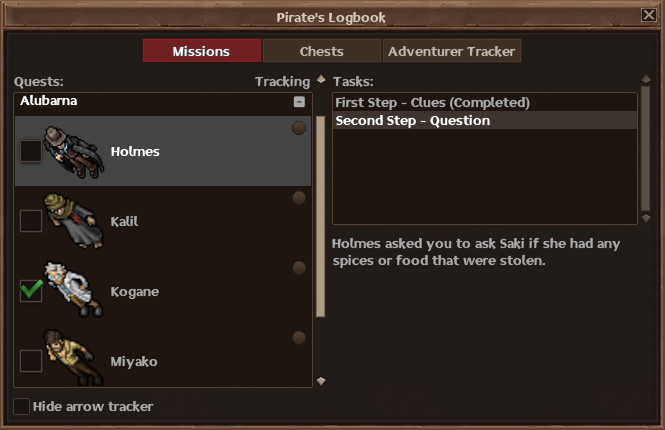
Nesta aba, o jogador pode acompanhar as missões em progresso que foram aceitas com os NPCs. As missões são organizadas por ilha ou pelos mares East Blue e Grand Line.
Ao selecionar um NPC, a lista de Tarefas mostra as etapas concluídas e pendentes da missão, além da descrição de cada tarefa.
- Quando todas as tarefas disponíveis de um NPC foram concluídas, uma marca de confirmação aparece ao lado da sprite do NPC. Isso indica que todas as tarefas disponíveis até aquele momento foram entregues, mas não significa necessariamente que todas as missões daquele NPC foram concluídas.
- O círculo localizado no canto direito do card do NPC permite adicionar ou remover aquela missão do rastreador de missões, onde as missões selecionadas ficam fixadas no canto superior direito da tela do jogo

- A opção Esconder seta de rastreio oculta as setas que apontam para os NPCs ou objetivos relacionados às missões selecionadas no rastreador
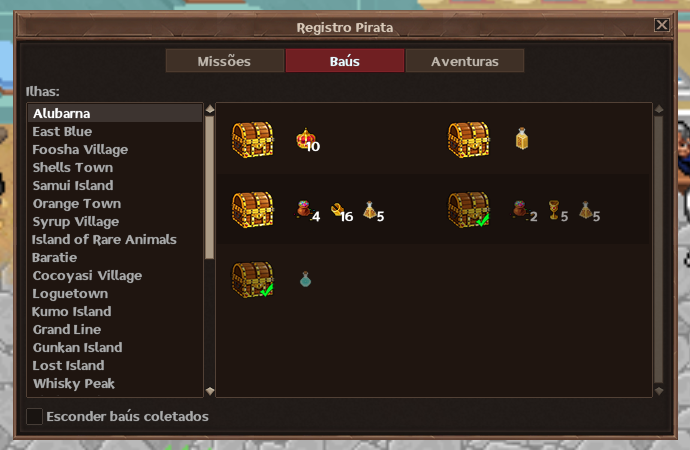
Nesta aba, o jogador pode consultar os baús disponíveis em todas as ilhas e nos mares East Blue e Grand Line.
Ao selecionar uma ilha ou um dos mares, são exibidos os baús disponíveis e suas respectivas recompensas.
- Os baús já coletados aparecem com uma marca de confirmação, facilitando a diferenciação dos que ainda estão disponíveis. Também é possível marcar a opção Esconder baús coletados, no canto inferior esquerdo, para visualizar apenas os baús ainda disponíveis.
- O progresso exibido é individual para cada personagem. Ao trocar de personagem, a aba passa a mostrar os baús coletados e disponíveis daquele personagem.
- Ao abrir o Registro Pirata na aba Baús enquanto estiver em uma ilha ou em um dos mares, a instância atual do jogador aparece como primeira opção da lista, facilitando o acesso aos baús do local onde ele se encontra.
Para consultar a localização, o nível necessário e outras informações de cada baú ou ilha, veja nossa página de Baús.
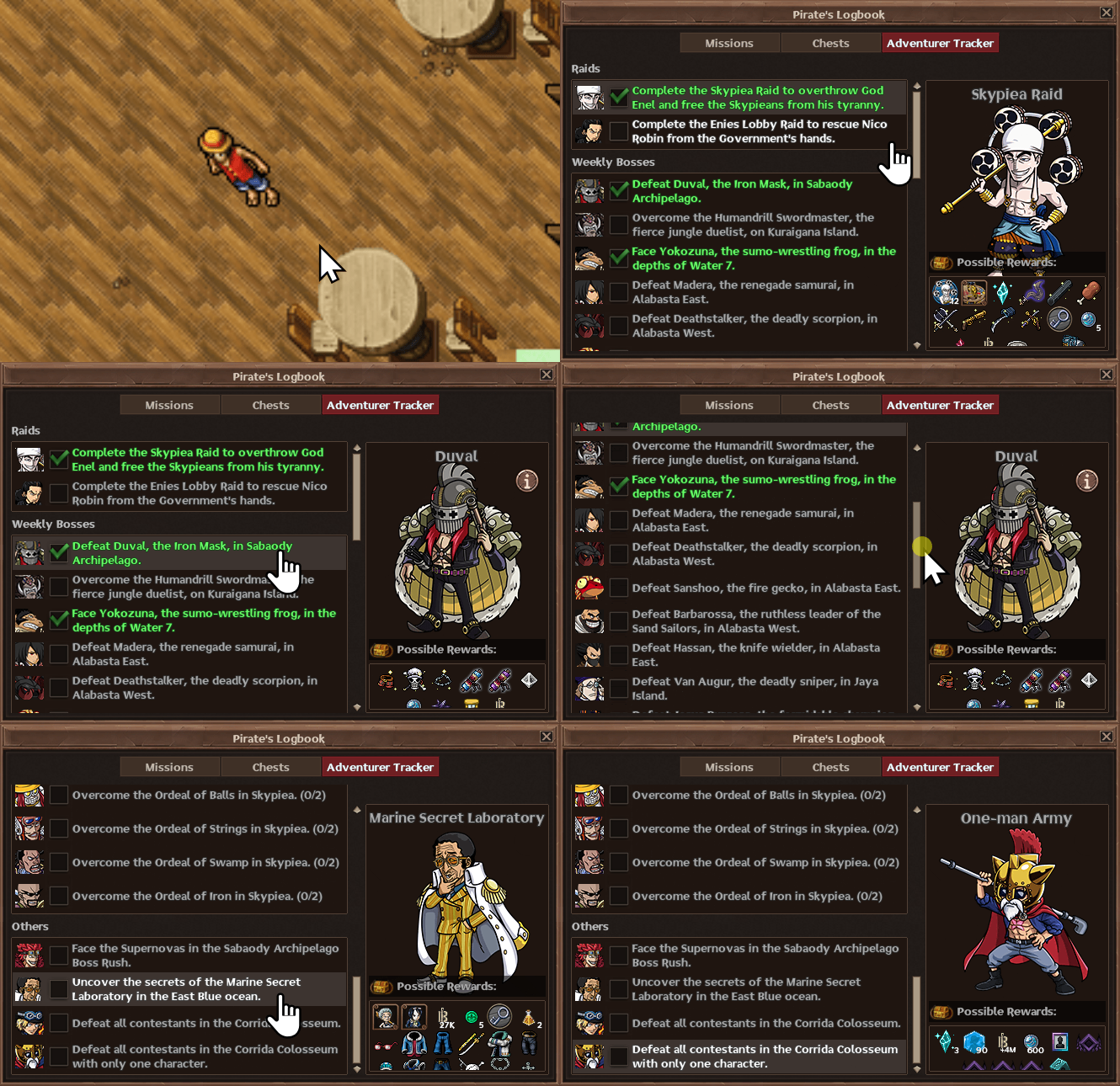
Nesta aba, o jogador pode acompanhar o progresso semanal em conteúdos recorrentes e outras atividades importantes do jogo, verificando quais já foram concluídos durante a semana.
Os conteúdos são separados por categoria, como Raids, World Bosses, Weekly Bosses e Outros.
- Ao selecionar um conteúdo, é possível consultar suas possíveis recompensas no painel à direita. Nas Raids e nos Weekly Bosses, são exibidas apenas as recompensas da dificuldade Hard. As recompensas das demais dificuldades podem ser consultadas diretamente no local de cada Boss.
- A lista permite acompanhar quais conteúdos já foram concluídos e tiveram sua recompensa semanal recebida, facilitando a visualização do que ainda está disponível para ser concluído durante a semana.
- Nos Weekly Bosses, também é possível consultar os personagens MVC atualmente ativos para cada Boss.
A aba reúne conteúdos como World Bosses, Boss Rush, a missão Laboratório Secreto da Marinha, a Corrida Colosseum e as Provações de Skypiea. Mais informações sobre esses conteúdos podem ser consultadas em suas respectivas páginas na Wiki.
The Pirate's Logbook provides information for tracking account and character progression across three tabs: Missions, Chests, and the Adventurer Tracker. It can be accessed using the L shortcut.
In this tab, players can track quests in progress that have been accepted from NPCs. Quests are organized by island or by the East Blue and Grand Line seas.
When an NPC is selected, the Tasks list displays the completed and pending steps of the quest, along with the description of each task.
- When all currently available tasks from an NPC have been completed, a check mark appears next to the NPC's sprite. This indicates that all available tasks up to that point have been completed, but does not necessarily mean that every quest from that NPC has been completed.
- The circle on the right side of the NPC card can be used to add or remove that quest from the Quest Tracker, where selected quests remain pinned in the upper-right corner of the game screen
- The Hide arrow tracker option hides the arrows pointing toward NPCs or objectives related to quests selected in the Quest Tracker
In this tab, players can check the chests available on every island and throughout the East Blue and Grand Line seas.
Selecting an island or one of the seas displays its available chests and their respective rewards.
- Chests that have already been collected appear with a check mark, making them easy to distinguish from those that are still available. The Hide collected chests option in the lower-left corner can also be enabled to display only the chests that are still available.
- The progress shown is individual for each character. Switching characters updates the tab to show the collected and available chests for the character currently being used.
- When the Pirate's Logbook is opened on the Chests tab while the player is on an island or in one of the seas, the player's current instance appears as the first option in the list, making it easier to access the chests in the current area.
For the location, required level, and other information about each chest or island, see our Chests page.
In this tab, players can track their weekly progress in recurring content and other important activities, checking which ones have already been completed during the week.
Content is separated into categories such as Raids, World Bosses, Weekly Bosses, and Others.
- Selecting an activity displays its possible rewards in the panel on the right. For Raids and Weekly Bosses, only rewards from Hard difficulty are displayed. Rewards from other difficulties can be checked directly at each Boss's location.
- The list shows which activities have already been completed and had their weekly reward claimed, making it easier to see what is still available to complete during the week.
- For Weekly Bosses, the currently active MVC characters for each Boss can also be checked here.
The tab includes content such as World Bosses, Boss Rush, the Secret Marine Laboratory quest, Corrida Colosseum, and the Skypiea Ordeals. More information about these activities can be found on their respective Wiki pages.